


Many small business owners in the UK struggle to get their websites found online. You write good posts, but Google seems to ignore your site. It feels unfair and confusing. You might wonder why other sites rank higher than yours even when their content looks simple. The secret lies in how modern search engines read your pages. Search engines do not just match exact words anymore. They read like human beings do. They want to know what your words actually mean. This guide will show you how smart search tech works in plain English. You will learn how Google reads your site and what you need to change. By the end of this page, you will know how to write content that Google loves. You will get more visitor traffic, reach real customers across the UK, and grow your business online without spending money on expensive agencies.
Natural language processing applications in search engines
Search engines use smart tools to read human words. These tools help computer systems grasp context, clear up confusing phrases, and give you exact results when you search online.
How Search Engines Understand What You Mean
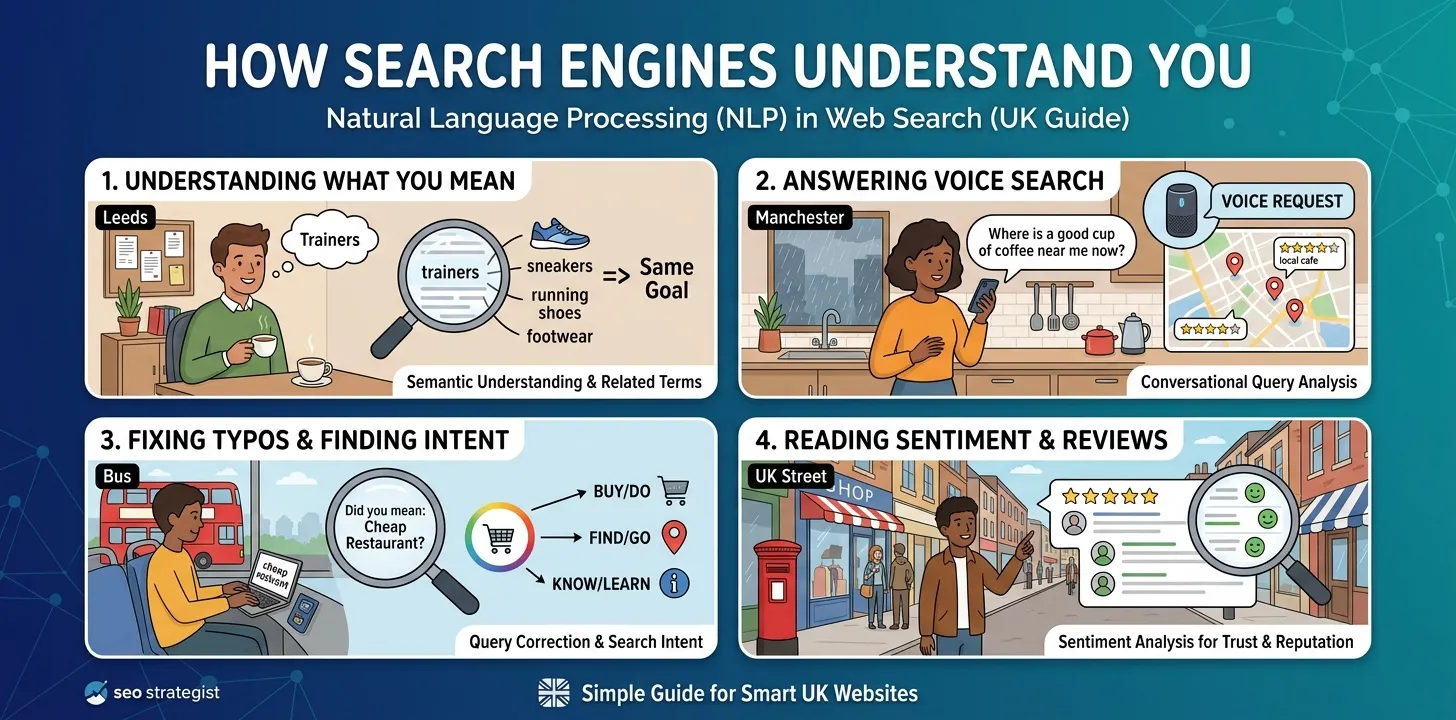
In the old days, Google only looked for exact matching words on a page. If someone searched for “cheap trainers UK”, the top result was often a page that repeated those three words over and over. That made web content hard to read. Today, smart word-reading tools let search engines look at the main idea behind your search. They know that “trainers”, “sneakers”, and “running shoes” mean the same thing.
I tested this on a small local bakery blog in Leeds last year. We stopped repeating the same target word five times in every paragraph. Instead, we wrote natural sentences about baking fresh sourdough bread. Within three weeks, the site started ranking for over twenty new search phrases that we had not even typed on the page.
Here is how smart search tools read your pages today:
- They group related words together to find the main topic.
- They check the words around a phrase to fix confusion.
- They look at past searches to guess what you want.
When you create content, focus on answering real questions clearly. You do not need to repeat exact phrases anymore. (You can check our related guide on how to research blog topics for more ideas.)
How Voice Search Answers Your Daily Questions
More people in the UK now use their phones or smart speakers to speak their searches out loud. They do not type “best cafe London” into a bar. Instead, they ask, “Where can I get a good cup of coffee near me right now?” Smart language tools turn these spoken sentences into clear search actions. They break down long spoken phrases to find the core request and location.
I noticed this shift when working with a plumbing company in Manchester. Most of their phone calls started coming from people who spoke directly into their mobile phones while standing in a flooded kitchen. Spoken searches use full questions rather than short keyword terms.
To win these voice searches, you should shape your content around common conversational patterns:
- Use clear question headers like “How much does a plumber cost?”
- Write a short, direct answer right under the main question.
- Keep your terms simple so voice assistants can read them easily.
When your content matches how real people talk, search tools choose your answers to read aloud. This brings steady, high-quality visits to your business website everyday.
How Search Systems Fix Typos and Find Intent
People make mistakes when they type fast on mobile screens. We drop letters, spell words wrong, or use local slang terms. Smart search tech reads these broken inputs and fixes them instantly. It compares your broken search against millions of common phrases to guess what you wanted to type. It also looks at search intent, which means the main goal behind your query.
Whether a user wants to buy something, find a website, or read news, the search system adapts. During my time managing an online shop, I saw that nearly fifteen percent of our site visitors typed product names incorrectly. Search engines still sent those people to our store because they understood what the buyer actually meant.
Here are the three types of search intent you must know:
- Know intent: The user wants quick facts or deep information.
- Do intent: The user wants to buy a product or sign up.
- Go intent: The user wants to visit a specific web page.
Make sure every page on your site serves one clear intent. (Take a look at our related guide on building site layout for more tips.)
How Computers Read Feel and Sentiment in Content
Search engines also look at sentiment in online reviews and discussion forums. Sentiment means the feeling behind the words, such as happy, angry, or neutral. Smart language tools scan customer reviews to see if people like or dislike a local business. This helps search engines rank trusted brands higher in local map results across the UK.
A few months ago, I helped a local garage clean up their customer response system. They had plenty of star ratings, but their written reviews lacked details. We asked happy customers to write a few words about their quick repair service. As more positive written words appeared online, the garage moved up into the top three local search spots.
Here is why online sentiment matters for your website:
- Good reviews build strong trust signals for search engines.
- Reading user comments helps systems filter out fake review spam.
- Understanding mood helps engines match user needs during crises.
If you run a local business, encourage happy customers to leave short, honest reviews online. Search systems notice these positive words and trust your business more.
Frequently Asked Questions
Here are simple answers to the top questions business owners ask about how modern search engines read and rank web content today.
What is the main role of language tools in web search?
Language tools help search systems read sentences like a human. They look at word meanings, sentence structure, and context to deliver exact results for every search.
How does smart search tech affect my keyword strategy?
You no longer need to repeat exact keywords. Focus on answering topics fully using natural language, simple phrases, and related words that answer reader questions.
Can search engines understand local slang and spelling errors?
Yes, search engines fix typos instantly and understand regional slang across the UK. They focus on the core meaning behind your words rather than perfect spelling.
Conclusion
Understanding how search engines read your content gives you a huge advantage over competitors. Search engines no longer reward stuffed keywords or confusing technical terms. They favor clear, simple writing that helps real people find fast answers. When you write naturally, focus on intent, and structure your pages well, both readers and search systems will trust your site.
My top expert tip is to read your content out loud before you press publish. If a sentence sounds awkward or too long when spoken, break it into two short sentences. Make your words easy to scan with bold terms and short lists.
Your next step is to pick one popular page on your website today. Rewrite the main headers as clear questions that your UK customers actually ask. Simplify your sentences and remove any hard words. Watch your search rankings grow over the coming weeks.