

Many people in the UK struggle to focus at work. You might spend your whole day checking emails, answering messages, and making endless to-do lists. By five o’clock, you feel tired, but you still have not done your main tasks. This constant jumping between jobs wastes time and ruins your focus.
There is a simple way to fix this problem. It is called daily time blocking. This system helps you split your day into simple blocks of time. You assign one job to each block and ignore everything else.
In this guide, you will learn how to use daily time block plans to take back control of your day. We will look at simple layout ideas, top printable tools, and smart online setups. By the end of this page, you will know how to finish your work faster and enjoy stress-free evenings.
time blocking daily planner templates for focus
Time block plans divide your day into set chunks. Instead of using a simple list, you give every hour a job to help you focus on one task.
Simple Hourly Paper Sheets
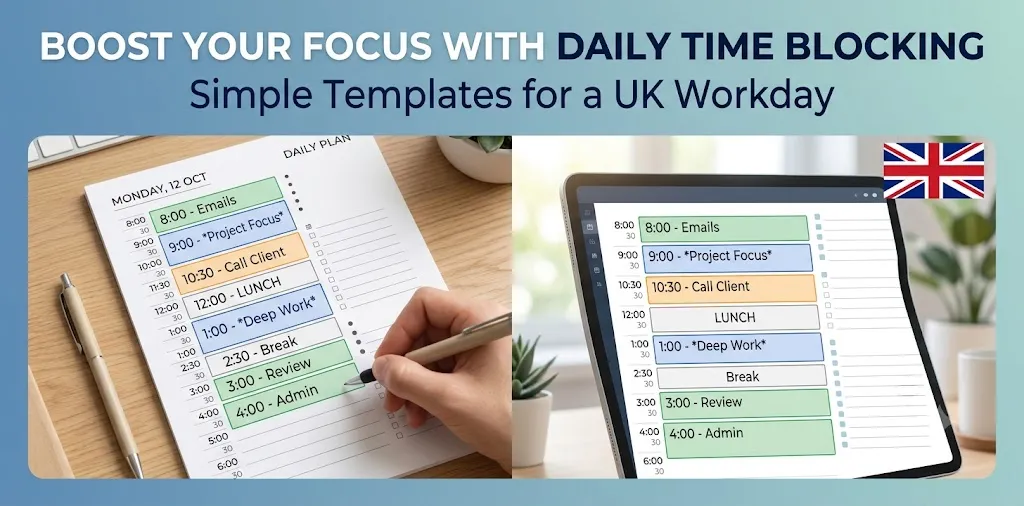
Paper sheets are the easiest way to start time blocking. You can print a page with hours listed down the left side, from 8:00 AM to 6:00 PM. Beside each hour, you draw a box and write one main job.
When I first tried this method at my desk in Manchester, I used a basic paper sheet to fix my workday. I used to check my email every ten minutes. Once I wrote “Emails” only in the 9:00 AM block and the 4:00 PM block, my screen distraction stopped right away. My main work got done two hours faster that day.
To make paper sheets work for you, follow these clear rules:
- Pick three main jobs: Write down your biggest tasks before your day starts.
- Add buffer time: Leave thirty blank minutes in the afternoon for unexpected phone calls or quick fixes.
- Use colored pens: Color deep work blocks in blue and easy admin tasks in green.
Paper sheets keep your routine right next to your keyboard. You do not need to open a new browser tab to see what comes next. If your day changes, you can just cross out a box and write a new job beside it. For a full breakdown of physical paper tools, check out our related guide on paper planner setups.
Digital Calendar Time Blocking
Digital tools like Google Calendar or Outlook make daily planning fast and clean. You create event blocks on your screen instead of writing on paper. You can drag boxes to make them longer or shorter as your schedule changes.
Digital blocks work best for people who work on computers all day. You can set quiet alerts on your phone or computer to tell you when a block starts. This stops you from working too long on one small job.
Here is how to build a strong digital grid:
- Set quiet hours: Turn off pop-up news alerts during your core work blocks.
- Group small tasks: Put phone calls, quick replies, and team updates into one single 45-minute block.
- Lock in lunch: Block out twelve to one every single day so nobody books a meeting while you eat.
Digital tools also let you repeat identical blocks every week. For example, you can set a “Weekly Team Update” block for every Monday morning with one click. This saves you from planning the same basic events every single day.
The Pomodoro Block Layout
The Pomodoro block layout combines set time blocks with short rest breaks. Instead of planning a solid two-hour block, you break that time into four small parts. You work hard for twenty-five minutes, then rest for five minutes.
During a project with a UK retail client last year, the team was feeling burnt out. They could not stay focused during long three-hour work blocks. We switched them to twenty-five-minute focus blocks with mandatory five-minute tea breaks. In just two weeks, the team finished their group tasks faster and reported much lower stress levels.
This structure works well because your brain stays fresh. Here is how a typical two-hour Pomodoro block looks:
- 25 minutes: Focus on writing or coding with zero interruptions.
- 5 minutes: Stand up, stretch, or grab a glass of water.
- 25 minutes: Continue working on the same single task.
- 5 minutes: Walk away from your desk screen.
- 25 minutes: Finish up the final details of the job.
- 25 minutes: Take a longer fifteen-minute rest break.
This setup prevents eye strain and keeps your mind sharp all afternoon. It stops you from feeling exhausted by the time you finish your work.
Day-Theming Layouts
Day-theming is a visual layout where each day of the week gets one clear focus. Instead of doing five different types of work every day, you group similar jobs onto specific days.
For example, a small business owner might make Monday an admin day, Tuesday and Wednesday sales days, Thursday a creation day, and Friday a review day. On your time block sheet, the whole page uses one main theme.
This style cuts down on mental switching costs. When you switch from writing a report to answering a billing question, your brain gets tired. Day-theming stops that constant switching.
- Monday Theme: Team meetings, inbox cleanup, and week planning.
- Tuesday Theme: Client calls, deep project work, and sales.
- Wednesday Theme: Product creation, writing, and deep research.
- Thursday Theme: Customer support, operations, and site fixes.
- Friday Theme: Finance checks, weekly reviews, and clean desk prep.
If you want to try this method, combine it with digital charts. You can read our related guide on weekly task organization to see how to align your themes with your long-term goals.
Frequently Asked Questions
Find quick answers below to the most common questions people ask online about using daily time block layouts to build focus and finish work faster.
How do I stick to a time block plan when unexpected tasks happen?
Leave one blank thirty-minute block in the middle of your afternoon. Use this open time to clear up sudden jobs, urgent phone calls, or unexpected work requests without ruining your day.
What is the best time block layout for beginners?
The simple 1-hour paper sheet is best for beginners. It is cheap, easy to fix with a pen, and sits right on your desk where you can see it all day.
How long should my focus blocks be?
Most people focus best in blocks of 45 to 90 minutes. After 90 minutes, your brain needs a short break to rest, stretch, and get ready for the next task.
Conclusion
Time blocking is one of the best ways to gain focus and control your day. When you assign every hour a clear job, you stop wasting time on small distractions. You no longer sit at your desk wondering what to do next. Whether you choose paper sheets, digital apps, or short rest blocks, the goal stays the same. You build a clear plan that protects your energy and gets your main work done.
Here is my top expert tip: always fill out your time block plan the night before. Spending five minutes at the end of your day saves you thirty minutes of confusion the next morning.